

iRacing | Die Season 3 von 2026 bietet einen kostenlosen BMW und eine neue NASCAR-Strecke und ist ab sofort verfügbar
-
thedoctor -
9. Juni 2026 um 21:32 -
- Update
- PC
-
940 Mal gelesen -
0 Antworten -
26 Minuten
Keine News mehr verpassen!
Füge uns bei Google als bevorzugte Quelle hinzu und sieh unsere News häufiger in deinen Suchergebnissen.
Jetzt als bevorzugte Quelle hinzufügen →
Füge uns bei Google als bevorzugte Quelle hinzu und sieh unsere News häufiger in deinen Suchergebnissen.
- Dem iRacing-Build für Season 3 2026 wurden vier neue Fahrzeuge und eine neue Rennstrecke hinzugefügt.
- Ein neuer Laserscan von Laguna Seca ist ebenfalls enthalten.
- Darüber hinaus wurden KI-Funktionen für Dirt-Rennen inklusive Vorläufen in den aktuellen Build integriert.
Mit dem neuen iRacing-Build, der nun zur Verfügung steht, wurden in Season 3 vier neue Fahrzeuge, eine zusätzliche Rennstrecke und die KI-Unterstützung für Dirt-Rennen eingeführt.
Neue Fahrzeuge im iRacing-Build für Season 3 2026
- BMW M2 Racing (G87)
- Euro NASCAR RC01
- Zwei neue Formula-Vee-Fahrzeuge (Cutlass und Conqueror)
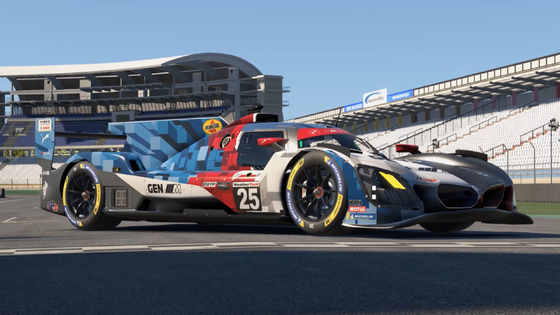
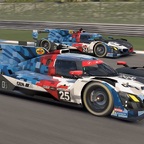
- BMW M Hybrid V8 Evo (Upgrade 2026)
- Aktualisierungen für NASCAR Whelen Tour Modified und SK
Zu den neuen Fahrzeugen in der dritten Season zählt der BMW M2 Racing, der als aktuelles Element in den Basisinhalt der Simulation aufgenommen wird und damit allen Abonnentinnen und Abonnenten ohne zusätzliche Kosten zur Verfügung steht.
Die G87-Version des M2-Sportwagens ist ein idealer Einstiegsrennwagen mit moderater Motorleistung, Hinterradantrieb und einer ausgereiften Fahrwerksabstimmung. Anstelle des Sechszylinder-Motors des straßenzugelassenen M2 ist der M2 Racing jedoch mit einem Zweiliter-Vierzylinder ausgestattet, weshalb der Klang nicht ganz mit der Fahrdynamik mithalten kann.
Der Euro NASCAR RC01 stellt ein weiteres Einsteiger-Stockcar für die Simulation dar und bringt mit seinem V8-Motor eine Leistung von 400 PS auf die Strecke. Es handelt sich dabei um das offizielle Chassis der NASCAR Euro Series, einer von vier offiziell anerkannten NASCAR-Meisterschaften außerhalb der USA (neben Brasilien, Kanada und Mexiko).
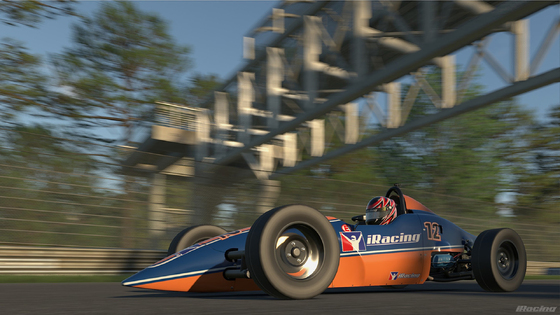
Ergänzend erweitern zwei neue Formula-Vee-Modelle das bisherige Angebot und sind in einem Zwei-für-eins-Paket enthalten. Das bestehende Fahrzeug wird in „Formula Vee Classic“ umbenannt, während die neuen Modelle die Bezeichnungen „Cutlass“ und „Conqueror“ tragen. Alle drei Fahrzeuge nutzen identische Fahrphysik, unterscheiden sich jedoch in der Gestaltung der Karosserie.
Obwohl es sich nicht um ein vollständig neues Fahrzeug handelt, wird in Season 3 die Evo-Version des BMW M Hybrid V8 eingeführt. Alle bisherigen Besitzerinnen und Besitzer des Originalfahrzeugs erhalten das Upgrade automatisch.
Die Fahrzeuge der NASCAR Whelen Tour Modified und SK wurden ebenfalls überarbeitet und verfügen nun über komplett neue Reifen.
Strecken im iRacing-Season-3-Build 2026
- Qualcomm Circuit (Naval Base Coronado)
- Laguna Seca (neuer Laserscan)
- Motorsport Arena Oschersleben (3D-Kerbs)
- Circuit de Nevers Magny-Cours (3D-Kerbs)
- Oran Park Raceway (verbesserte Streckenmodellierung)
- Chicagoland Speedway (NASCAR-Aktualisierung 2026)
- Charlotte Motor Speedway (neues Rallycross–Dirt-Road-Layout)
Die herausragendste Neuerung in Season 3 ist der Qualcomm Circuit (Naval Base Coronado), ein kalifornischer Marinestützpunkt, der umgebaut wurde, um am kommenden Wochenende (20.–21. Juni 2026) die NASCAR Cup Series sowie die zugehörigen Vorrennen auszurichten.
Zusätzlich wurden zahlreiche bestehende Strecken der Simulation überarbeitet. An erster Stelle steht ein vollständiger neuer Laserscan von Laguna Seca. Oschersleben und Magny-Cours erhalten 3D-Kerb-Upgrades, während Oran Park und der Chicagoland Speedway grafische Überarbeitungen der Streckenoberflächen erfahren.

Abschließend erhält der Charlotte Motor Speedway ein neues Dirt-Layout: Rallycross – Dirt Road.
Dirt-KI
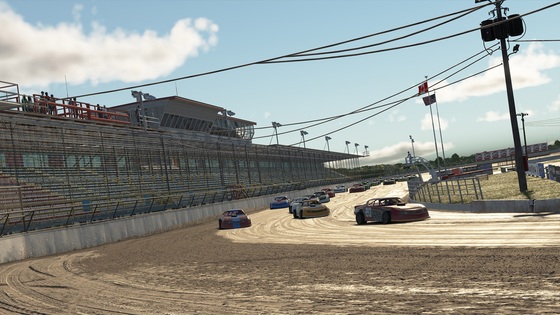
Die KI für Dirt-Rennen wird in Season 3 erstmals eingeführt; mit dieser seit Langem nachgefragten Funktion halten zugleich KI-Vorläufe Einzug.
Die Einführung erfolgt jedoch schrittweise, sodass iRacer diese neue Funktionalität zunächst ausschließlich auf Dirt-Ovalen und vorerst nur mit zwei Fahrzeugen und zwölf Streckenlayouts nutzen können.
Sim-Benutzeroberfläche
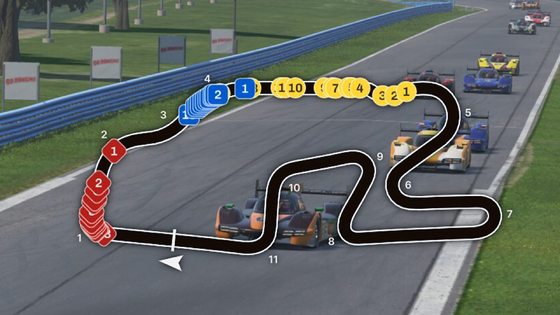
Die Benutzeroberfläche der Simulation wurde um drei neue Widgets erweitert, die den Spielenden zur Verfügung stehen. Der Kraftstoffrechner, der Incident-Tracker (Vorfall-Tracker) sowie eine dynamische Streckenübersicht können nun in iRacing verwendet und individuell konfiguriert werden.
Changelog iRacing 2026 Season 3
iRACING Launcher
—---------------------------------------------------------
Series-Specific Sporting Regulations & Branding
- A new feature has been added: Series-Specific Sporting Regulations & Branding!
- This feature provides a way to add a few additional real-world rules, pit stop procedures, or vehicle adjustments to an event, such as locking certain options or enabling different car configurations.
- Each event can have one set of regulations applied, and will take effect on the relevant cars in the event. If the selected set of regulations is not applicable, or no relevant cars are in the event, nothing will change.
- Series-Specific Sporting Regulations & Branding are available for selection when creating Hosted Sessions, including League events, but are not available for use if AI Opponents are included in the event - they don’t play by the rules, yet.
- When creating your Hosted Session, under Race Options you'll find the dropdown menu for Series Rules & Branding. Here, you'll now see a list of Regulations. Only 1 may be selected.
- Series-Specific Sporting Regulations & Branding are not yet available and do not function in Test Drive or AI Racing events - this includes Test Drive Sessions launched from Official Series events.
- For 2026 Season 3, a small number of Official events will also support the use of Series-Specific Sporting Regulations. This means that these official iRacing events and Series will have these regulations in effect during the event for a more real-world racing experience. The Series and Events for 2026 Season 3 that will be using Series-Specific Sporting Regulations include the following:
- Official Series:
- BMW M2 Cup by Nitro Concepts = Rookie Ruleset
- IMSA Endurance Series = IMSA Ruleset
- IMSA iRacing Series = IMSA Ruleset
- IMSA iRacing Series - Fixed = IMSA Ruleset
- IMSA Michelin Pilot Challenge Series = IMSA Ruleset
- IMSA Sportscar Endurance Challenge = IMSA Ruleset
- iRacing DTM Series = DTM Ruleset
- Nurburgring Endurance Championship (NEC) = NEC Ruleset
- Special Events:
- Watkins Glen 6 Hour = IMSA Ruleset (June 19th)
- 6 Hours of Road America = IMSA Ruleset (July 24th)
- Petit LeMans = IMSA Ruleset (2026 Season 4)
- Official Series:
- To see if an event has specific regulations enabled, once you enter the Session, you can navigate to the “Rules” tab, and under the ‘vehicle’ tab you can see if a set of regulations are active. A mouse-over tool-tip will also detail what these rules are. This marker and mouse-over tool-tip are also present in the fuel and tires blackboxes should you wish to check which set of regulations are in use before making a pitstop. If no value is present, the default regulations are in effect.
- Regulation Options and Supported Vehicles:
- None (Global / Default) - Global / Default vehicle branding and global pit stop regulations. Fuel service will be completed before tire service begins.
- GTP Class & Ferrari 499P
- GT3 Class (Active Vehicles in Official Racing)
- GT4 Class (Active Vehicles in Official Racing)
- TCR Class (Active Vehicles in Official Racing)
- Additional Vehicles: BMW M2 Racing (G87), Dallara P217, Ligier JS P320, Porsche 911 Cup (992.2)
- IMSA - IMSA vehicle branding where applicable. Fuel service and tire service are completed simultaneously.
- GTP Class & Ferrari 499P
- GT3 Class (Active Vehicles in Official Racing)
- GT4 Class (Active Vehicles in Official Racing)
- TCR Class (Active Vehicles in Official Racing)
- Additional Vehicles: BMW M2 Racing (G87), Dallara P217, Ligier JS P320, Porsche 911 Cup (992.2)
- NEC - Global / Default vehicle branding. Fuel and tire service are completed simultaneously, however fuel service is at the substantially slower fuel rate of the Nürburgring pit lane fuel pumps.
- GT3 Class (Active Vehicles in Official Racing)
- GT4 Class (Active Vehicles in Official Racing)
- TCR Class (Active Vehicles in Official Racing)
- Additional Vehicles: BMW M2 Racing (G87), Porsche 911 Cup (992.2)
- DTM - Global / Default vehicle branding. Fuel service and tire service are completed simultaneously, additional crew are available for substantially faster tire changes.
- GT3 Class (Active Vehicles in Official Racing)
- WSC2017 - Global / Default vehicle branding and global / default pit stop regulations. The Dallara P217 engine power is increased to 600 hp with an 8700 rpm limiter and additional short stack gear option. Any other vehicles in a session will default back to their global pit stop ruleset. For a more period accurate LMP2 experience members may also want to apply -30kg BoP in hosted sessions.
- Dallara P217
- ROOKIE - Global / Default vehicle branding and global pit stop regulations. Fuel service will be completed before tire service begins. BMW M2 Racing (G87) is locked to power class 1 (270hp).
- BMW M2 Racing (G87)
- INDY - Tire Branding for the Indianapolis 500. Only available at Indianapolis Motor Speedway. No changes to standard Indycar rules.
- Dallara IR18
- Dallara DW12
- Dallara IR-05
- PMNA - Porsche Motorsport North America branding for Porsche 911 Cup (992.2). Pirelli branded tires will be used. Fuel service will be completed before tire service begins. Traction Control is disabled.
- Porsche 911 Cup (992.2)
- NOTC - Global / Default vehicle branding and global pit stop regulations. Traction Control is disabled. Fuel service will be completed before tire service begins.
- GTP Class & Ferrari 499P
- GT3 Class (Active Vehicles in Official Racing)
- GT4 Class (Active Vehicles in Official Racing)
- TCR Class (Active Vehicles in Official Racing)
- Additional Vehicles: BMW M2 Racing (G87), Dallara P217, Ligier JS P320, Porsche 911 Cup (992.2)
- NOABS - Global / Default vehicle branding and global pit stop regulations. Anti-Lock Braking Systems are disabled. Fuel service will be completed before tire service begins.
- GT3 Class (Active Vehicles in Official Racing)
- GT4 Class (Active Vehicles in Official Racing)
- TCR Class (Active Vehicles in Official Racing)
- Additional Vehicles: BMW M2 Racing (G87), Porsche 911 Cup (992.2)
- NOABSTC - Global / Default vehicle branding and global pit stop regulations. Anti-Lock Braking Systems and Traction Control Systems are disabled. Fuel service will be completed before tire service begins. Any vehicles marked for ruleset support that are missing a system, such as TCR not having traction control or GTP not having anti-lock brakes will only have the relevant system disabled. This set of regulations effectively eliminates electronic driver aids for supported vehicles.
- GTP Class & Ferrari 499P
- GT3 Class (Active Vehicles in Official Racing)
- GT4 Class (Active Vehicles in Official Racing)
- TCR Class (Active Vehicles in Official Racing)
- Additional Vehicles: BMW M2 Racing (G87), Porsche 911 Cup (992.2)
Series Discovery
- We've heard you and have made some changes to how filtering with Racing Disciplines and Tags function on the Official Series page.
- When first selecting Official racing, everyone will be prompted to choose one (or more!) preferred racing discipline(s). Select Oval and Dirt Oval if that's how you prefer to race. Or choose to hone in on just Formula series. The choice is yours! You can also change your preferences at any time.
- Now, when using Tags to filter within the Official races, Tags work in conjunction with the currently chosen preferred racing discipline(s). Want to find only Class A, Ranked series, but only for your Oval preference? You can do that.
- Be aware of the “Match All Tags” toggle within tags, as this is the difference between seeing only "Class A Ranked Oval series" and seeing series that are either "Class A Oval" or "Ranked Oval" when Class A and Oval are selected within Tags.
- To restart the full Series Discovery experience again, navigate to Account > Options > Preferences, and then select “Run Series Discovery”.
Updater
- A new logo has been added to the iRacing Updater.
Installer
- A brand-new visual treatment has been applied to the iRacing Installer!
Options
- An option has been added near the current networking option to enable IPv6 called “Use Anycast”. This option is defaulted to "on" and enables the Anycast setting in the app.ini file.
- You can read more about Anycast in the Connectivity section below!
Foreign Language Support
- Simplified Chinese is now available as a supported language choice within the iRacing Launcher!
Paint Kit
- The following new sponsors have been added to the Paint Kit:
- 51 Racing Podcast
- Acceptance Insurance
- Arctic Wolf
- AutoVentive
- Braid Wheels
- Clopay
- Comprehensive Logistics
- Corbeau
- Evolve Transporters
- Foundation For Pops
- Freeway Insurance
- Hawk Performance
- Java House
- Koni
- McLaren Transport
- Millers Oils
- PCs by Thomas
- Pigeon Forge Racing Coaster
- Podium 1
- R53 Suspension
- Racing Optics
- Rackley Roofing
- RE/MAX
- Rich Mar Florist
- Rose Pest Solutions
- Sonsio
- Sweetwater Construction
- Vyper
- W.A.R. Shocks
- The following sponsors have received logo updates, or additional colorways have been added to the Paint Kit:
- Aaron’s
- Ansys
- BBS
- DQS Solutions & Staffing
- Five Star Bodies
- Hyperco
- J.F. Electric
- Kubota
- MillerTech
- SRI
- UNOH
- Utilitra
Safe Mode
- Fixed a crash that could occur when launching iRacing in Safe Mode.
iRACING SIMULATION
—---------------------------------------------------------
AI Racing
- The wait is over! AI Drivers are now ready to sling dirt at oval tracks!
- This first implementation focuses only on two popular dirt cars: the Dirt Legends Ford '34 Coupe, and the Dirt Street Stock. Rest assured, more will be unlocked over time as we continue our intensive and challenging Dirt AI training program! AI Racing is immediately available at TWELVE Dirt Oval tracks!
- AI Heat Racing is here!
- Heat Racing formats are now selectable and usable when including AI Opponent Rosters. This includes all formats and types of events, such as Leagues, solo, or AI Seasons!
- AI Drivers are now licensed to drive the following new vehicles:
- Dirt Legends Ford '34 Coupe
- Dirt Street Stock
- BMW M2 Racing (G87)
- EURO NASCAR RC01
- Formula Vee - Cutlass
- Formula Vee - Conqueror
- Pontiac Solstice
- Pontiac Solstice - Rookie
- Radical SR8
- AI Drivers are now trained for racing at the following new tracks and configurations:
- TWELVE Dirt Oval Race tracks:
- Bristol Motor Speedway - Dirt
- Bristol Motor Speedway - Dirt - 2021
- Eldora Speedway
- Fairbury Speedway
- Huset's Speedway
- Kevin Harvick's Kern Raceway - Dirt Track
- Lanier National Speedway - Dirt
- Lernerville Speedway
- Limaland Motorsports Park
- Lucas Oil Speedway - Dirt Oval
- Port Royal Speedway
- The Dirt Track at Charlotte
- Autodromo Nazionale Monza - Combined, Combined without chicanes, & Combined without first chicane
- WeatherTech Raceway Laguna Seca
- AI Drivers have leveled up their driving skills with the following vehicles:
- <Car Class> NASCAR Legends 1987 Class Cars
- <Car Class> NASCAR Cup Next Gen Class Cars
- Audi 90 GTO
- NASCAR Whelen Tour Modified
- NASCAR Whelen Tour Modified - SK
- Radical SR10
- AI Drivers have improved their racing skills at the following tracks and configs:
- The Nürburgring (all configs)
- Watkins Glen International (Boot & Classic Boot)
- Sebring International Raceway - International, Modified
- Rockingham Motor Speedway - Oval
- Chicagoland Speedway
- The Spring 2026 AI Training Semester heavily focused on dirt racing, of course. Classes, materials, and seminars included the following:
- The Wild West of Applied Racing Geometry (A Yee-Haw Yaw Presentation)
- Geology 303: Sands & Muds of Planet Earth
- Navigating Race Lines with an AI Emeritus
- Turning Left to Go Straight and Other Conundrums of the Dirt Racing World [2nd Edition]
- Basic Earth Magic - Geomancy for the Novice
- A Study in Rubber: Front versus Rear Tire Degradation Rates
- How To Be a Pit Doctor - Vehicle Damage Triage & Repair Time Estimation
- Sand Mandalas with 410’s at Eldora Speedway
- Improved the thermodynamics of tires on AI vehicles so that they better match what the player experiences.
- The temperature sensitivity and correlation that AI Drivers experience has been updated to be more comparable to that of players for the following vehicles:
- <Car Class> NASCAR Legends 1987 Class Cars
- NASCAR Whelen Tour Modified
- NASCAR Whelen Tour Modified - SK
- Radical SR10
- During a Race Weekend, AI Drivers have adjusted the fuel they use during Practice Sessions based on the length of the connected Race Session.
- Fixed a display issue with AI vehicles where their RPM and gearing could appear incorrect.
User Interface
- A new UI Widget has been added: Track Map!
- The new Track Map UI Widget enhances your situational awareness on track by providing a comprehensive visual of the entire track. You can use the Mini Map to learn the corners of a new track, or use the Radial Map to identify a gap for a strategic pit stop. By monitoring the real-time positions of other competitors, you can better anticipate traffic and navigate complex race scenarios.
- Setup and Customization
- Enable/Disable: The widget can be enabled or disabled via the Widget Editor.
- Label Options: Choose how cars are labeled: Car Number, Class Standings, or Driver Name.
- Mini Map Zoom: Controls the amount of track displayed. Available only in Mini Map mode.
- Player Relative Setting: Fixes the focus car's position for quick, consistent reference. Available only in Flat Map and Radial Map modes.
- Widget Scale: Adjusts the size of elements within the map for readability (ex. label text).
- Widget Resize: Drag the bottom left corner to adjust the widget's screen size. Note: Resizing the widget limits the display area but does not affect the size of map elements (ex. label text).
- 4 Available Map Modes
- Track Map
- Displays the entire track layout and all cars in the race.
- Displays turn numbers alongside the track.
- Mini Map
- Zooms in on your focus car and rotates to match the direction of travel.
- Flat Map
- Shows all cars on a single, horizontal line. This is ideal for minimal UI space, such as placement right above or below your virtual mirror.
- Radial Map
- Inspired by real world pit wall tooling, the Radial Map abstracts away the track shape to provide a strategic view of the race.
- Ring Details:
- Outer Ring: Shows cars on the lead lap. In multi-class races, the lead lap is determined by the focus car's class leader.
- Second Ring: Displays cars lapped once by the class leader. Ring is only visible if a car has been lapped.
- Third Ring: Displays cars lapped two or more times by the class leader. Only visible if a car is on this ring.
- Pit Lane: Cars in the pit lane are removed from the rings and shown on the horizontal line in the center of the map.
- Time Normalization: All rings are time normalized, meaning the gaps between cars is based on time, not distance. A dot will only move closer in a tight corner if you are actively gaining time on that car. Note: The pit line remains distance based.
- Car Iconography
- Car Class: The dot's shape and color are used to group cars by class.
- Focus Car: The focus car is larger, features a thick white outline, and is drawn below all other dots to ensure visibility of surrounding traffic.
- Lap Ahead: A red dotted outline signifies that the car has lapped you.
- Lap Behind: A light blue dotted outline signifies that you have lapped that car.
- Pace Car: The Pace Car is represented by a gray circle labeled "PC".
- A new UI Widget has been added: Fuel Calculator!
- This Drive Screen widget helps users determine when they should pit during a race.
- The Fuel Calculator will start trying to extrapolate fuel data after either 5% of the race time has passed or 10 minutes.
- It can be enabled/disabled via the Widget Editor.
- A number of calculation modes and values can be displayed. Settings for these are found in the Widget Editor. Calculation Modes differ based on what type of fuel usage value they use. The available modes are:
- Last Lap
- Last 10 Laps
- Session Average
- Minimum Lap Usage
- Maximum Lap Usage
- Target - Calculated values that may be useful in different situations. They are: Usage (units/lap), Laps to Empty, Fuel at End, Fuel to End, Pit Stops, Last Stint Fuel, or “Target Usage”
- Target Usage: A target usage value can be configured in the widget editor. This can be entered using either a units/lap value directly or as a target number of laps for a full tank, which will then be converted into a usage.
- Pit Window: There is a visual representation of the pit window starting and ending lap. A progress bar display window that lets the driver know when they can pit within a race. If the driver hasn't reached the beginning of the pit window, the progress bar fill is orange and the vertical lap indicator is gold. Once the driver is inside of the pit window, the progress bar fill changes to green and the vertical lap indicator is white.
- Green-White-Checker Estimation: Another feature of the Fuel Calculator is focused on Green-White-Checker racing conditions. A number of GWCs to use when estimating the race distance can be configured in the widget options. Values based on race distance are calculated both with and without this extra margin added. Either value can be displayed, or both can be displayed simultaneously. Values with the margin included are always shown in parentheses. GWC versions of values will not be calculated or displayed if the number of GWCs is set to 0.
- This Drive Screen widget helps users determine when they should pit during a race.
- A new UI Widget has been added: Incident Tracker!
- This UI Widget displays your incident points, the event limits, and DQ parameters.
- A new feature has been added to the Sim UI: Control Profiles!
- You can now swap control profiles from a dropdown in the Options screen. This follows all of the patterns of the existing UI Profile System. Your default controls will be imported and labeled as Baseline, while any car specific controls will create profiles named after the car.
- A new feature has been added to UI Widgets: Drag to Resize!
- Widgets can now be configured to allow for resizing using a handle like a typical windowed UI. For now, only the Track Map widget, virtual mirror, and vertical scaling on the session screen Chat Box are adjustable. If you want to resize these UI elements, you can go into edit layout mode (Alt+K) and drag the handle at the top to resize the windows.
- Radio channel names and names painted on cars do not have full unicode font/character support yet.
- Tire Compound stamps have been added for all tire compound types, including wet and dry.
- Tire Compound stamps will now be displayed for all cars in the Relative/Standing Blackbox & relevant UI Widgets.
- Added the display of the gap between classes during multi-class pacing to the UI.
- The number of in-Sim background colors that are used to distinguish car classes has been increased.
- For the Throttle/Brake Widget, ABS line highlights now show up in Replays.
- The Session Rules Widget has been added to the Session screen for Spotters and Spectators.
- In the Settings, added a new page, Force Feedback and Haptics.
- All of the advanced settings for FFB and haptics are moved here. (Basic functions for FFB are left duplicated on the driving page). This should make the Driving tab more usable while giving us room to grow our list of FFB and Haptic settings.
- For Time Attack Sessions, a confirmation dialog warning prompt has been added to the Quit prompt.
- It will only be displayed when there is a pending or in-progress upload, which would be canceled by quitting the SIM immediately.
- In Options, added auto-scrolling if a tooltip extends beyond the visible box area.
- Improved the rendering performance of the Results screen.
- Improved the rendering performance and smoothness of the track map in the Weather Widget.
- Updated a few key-bind tooltips and labels.
- Updated the “Next” and “Previous” session dialogs to be clearer.
- Updated some styling for radio buttons in Black Boxes.
- Force Feedback and Haptics Options tab labels have been shortened to Haptics and FFB respectively.
- Fixed an issue in determining binding conflicts in the Gear Calibration Wizard. Now those key bindings do not conflict with camera controls that are bound to the same keys.
- Fixed an issue where helmets and AI statuses could get jumbled in drop-up driver selection and laps table.
- Fixed an issue with the pedal input ABS telemetry graph where it would continue to move while a Replay was paused.
- Fixed an issue where the mouse cursor was not disappearing when touch-driving was being used.
Connectivity
- iRacing now supports Anycast network routing protocol for our Race Servers!
- Anycast routing means that traffic between you and our Race Servers will travel as short a distance as possible on the open internet before reaching our internet provider’s backbone to finish its path to and from our race servers.
- All race farms support both Unicast (traditional) and Anycast routing. By default, your system will reach our race servers via Anycast routing unless that path does not work, or you have disabled Anycast routing.
- You can tell iRacing not to use Anycast routing for your connections to Race Servers by opening the iRacing Launcher, clicking the Settings icon at the bottom left, selecting the Network tab, and moving the “Use Anycast” switch to off.
- For most customers, there will be little difference between connecting with Anycast (now the default) and Unicast routing. If Anycast routing has higher latency than Unicast for some reason, it is still preferred for more connection stability.
- In the iRacing Launcher, you can see your Unicast and Anycast ping times for each farm when you click the "Connections" icon on the top bar and hover your mouse cursor over the bar graphs next to each farm/protocol. Look at the "Average Ping" value.
- For more information, reference material, and customization options, check out the Customer Support page here: https://support.iracing.com/en/support/sol…anycast-routing
- A new command-line utility program is included in the iRacing installation: iRacingPing.exe!
- iRacingPing.exe is installed in the root of your iRacing installation. It is a command-line program, just like the normal Windows ping. To use it, open a command prompt, navigate to the iRacing install directory, and run it from there.
- For example: " D:\iRacing\> iracingping -? " will print usage information and exit the program. The general idea is to give it the hostname of one of our race farms or race servers, and it will probe it using all available networking protocols (IPv4, IPv6) and for both of those (Unicast, Anycast). It will not ping any other type of server.
- iRacingPing.exe is a utility that is similar to the Windows ping program, but it additionally supports ping probing using the new Anycast Routing that has been introduced. Using the Windows ping utility to ping our Ping and Race Servers can only probe them using Unicast Routing. The new iRacingPing utility can probe the iRacing Ping Server hostname provided using both Unicast and Anycast for both IPv4 and IPv6.
- The iRacing "Race Farm" hostname shown on the Rules tab on the Session screen in-sim is normally what you'd use (but exclude the ipv4: or ipv6: prefix, since the iRacingPing utility always pings using both protocols). These include:
- Sydney: iracingping AU-Syd.iracing.com
- Sao Paulo: iracingping BR-Sao.iracing.com
- Frankfurt: iracingping DE-Fra.iracing.com
- Tokyo: iracingping JP-Tok.iracing.com
- US East: iracingping US-East-OH.iracing.com
- US West: iracingping US-West.iracing.com
- A couple command-line options are available, similar to the Windows ping utility:
- Dash N (-n): Says to ping that number of times, instead of the default 4 ping probes.
- Dash T (-t): Says to keep pinging until the program is terminated using Control-C. Control-Break will log the stats so far and continue.
Physics
- Pit Speed Limiter functionality has been updated to utilize an improved speed-based PID controller. This aims to eliminate driveline oscillations that sometimes occur.
Dynamic Track Model
- Slightly adjusted and tuned how shadows impact track surface temperatures based on sun angles.
- In conjunction with an iRacing Weather System change, solar energy in Static Weather conditions has been reduced, bringing resulting track temperatures more in line with realistic weather modes.
- Improved the calculations for the heat transfer process from opponent vehicle tires sliding on a racing surface, particularly for dirt racing surfaces, and how it impacts the moisture content of the surface.
- Track cleaning processes and staff have been adjusted.
- At asphalt road tracks, the track cleaning staff have been made less efficient. Our simulated iRacing track cleaning staff were too good at their jobs and did not provide a real-to-life track cleaning experience. Now, between sessions with "Auto-Clean" ON and "Leave Marbles" OFF, the dust cleaning within the racing lines is slightly less effective, and some dust will be left on the track in areas not used during normal racing.
- Track dustiness and the generation of dust debris overall have been scaled down slightly.
- For track debris, scaled down the removal of dust and gravel due to aero effects. Gravel is now also slightly more difficult to remove than dust.
- As our Oval Refresh initiative continues, we have continued to dig deeper into the complex, shifting variables governing dynamic track behavior. Our current investigation focuses on the interplay between track surface temperature, rubber accumulation and the formation and migration of marbles. We are specifically analyzing how particle size and count dictates mechanical grip and overall performance.
- Also, we’ve been examining how the aerodynamic forces generated by passing cars actively help sweep the racing line. By capturing these aerodynamic displacement effects, we aim to more accurately simulate how marbles are cleared out of secondary grooves, ultimately restoring grip and widening driving lanes. Users should see a marked increase in the cleaning ability when running through marbles with these changes.
Race Control
- Pit speed rules have been updated to be slightly more strict and reduced tolerance for funny business. However, the Pit Speed Limiter system has been updated in conjunction with these changes to yield no problems and an ideal experience. Race control changes include:
- Tracking distances while speeding.
- Improved speed limit tracking precision.
- Pit speed UI now shows your speed with 1 decimal place of precision, since it is relevant.
- The pit speed UI's red "slowdown" coloring kicks in at exactly the pit speed limit.
- For dirt oval tracks, pit lanes are now open during races.
- Improved the pace car release timing during cautions.
- Fixed an issue where drivers could manipulate the race length by ignoring pace laps and continuing at race speed.
- Fixed an issue where the “Tow” option would not work while inside or within a short distance of your pit box.
Pit Lane
- Improved the display of your pit speed.
- Improved the Pit Speed Limiter “slow down” warning display behavior.
- Updated AutoFuel to be auto-enabled when leaving the pits (if 'autoFuelDefaultEnable' is set) regardless of the 'autoResetPitBox' and 'autoResetFastRepair' settings in app.ini.
Graphics
- The display of far terrains may no longer be disabled in the ".ini" file. This was never graphically intensive.
- Updated a variety of texture shaders at many tracks.
- Reduced the applicable vertical velocities on debris particles by roughly 25% to prevent excessive tossing of particulates.
- For OpenXR, added an app.ini file setting "ResolutionScalePct" to [OpenXR] section of rendererDX11OpenXR.ini. This will alter the resolution we render relative to the recommended resolution provided by the OpenXR runtime for the device.
- Fixed an issue where some particle types could appear to flicker or use an incorrect shader at night.
- Fixed an issue where detaching a wheel while a particle effect emitter on the wheel was active would have the particle emitter permanently enabled.
- Cleansed the world of vampiric rain. This terrifying rain could be identified by not being seen in mirrors. A slayer's job is never done.
Audio
- Improved the performance of rendered audio to improve CPU stability.
- Fixed an issue where audio emitters could be created in Replay mode that were not Replay audio emitters. This could negatively impact performance during Replay mode.
Spotter/Crew Chief
- New Spotter messages and behaviors have been added to improve player behavior when rejoining the track.
- The spotter now warns when the player car is at an unfavorable angle to the racing line and moving slower than surrounding traffic, and if off-track, moving toward the track. In such cases, a warning will be issued if cars are within five seconds behind, with a call stating "car approaching." If the player car is off-track, this will be followed by an instruction.
- If the driver is taking appropriate rejoin behaviors, including straightening out, speeding up, and preparing to rejoin the track safely, the spotter will stop making these new calls since you look like you know what you’re doing! Chattiness not set to “high” will also disable these safety calls.
- Low-priority spotter calls are now suppressed whenever high-priority calls are on the agenda.
- Spotter packs now support UTF-8 characters.
- A brand new Mandarin (Chinese) Spotter Pack has been enabled!
- Many thanks to Tong Li for the hard work on this brand-new pack!
- A brand new Czech Spotter Pack has been enabled!
- Many thanks to Mira “Chlaston” Chlastak for the hard work on this brand-new pack!
- The Italian Spotter Pack has been updated with the latest translations. Grazie, Renzo A. Olivieri!
- The Spanish Spotter Pack has been updated with the latest translations. Gracias, Ari Cejas!
- The Portuguese Spotter Pack has been updated with the latest translations. Grato, Guto Colvara!
Weather
- In conjunction with a Dynamic Track System change, solar energy in Static Weather conditions has been reduced, bringing resulting track temperatures more in line with realistic weather modes.
- Fixed an issue where track temperatures could change when restarting a session.
- Fixed an error with track water drain efficiency at a variety of tracks to improve water drainage.
Controls
- Fixed several issues with keybindings:
- The Ignition Control can again be bound to switches, with the Enter key triggering the bind action after the switch has been turned on.
- Multi-button presses can again be bound to controls.
- Added binding display of more cases - One key bound to multiple functions now displays a list of Controls bound to the key.
- If multiple keys are pressed, if they are bound to one Control, that control is listed; otherwise, either the list of keys and controls bound to them is listed, or the button-pair is listed with nothing (or something) bound to it.
Replays
- A variety of vehicles’ dashboard values should now display more appropriate numbers instead of entirely incorrect info. This change impacts opponent cars only - not your car, for which you have the real data.
- Fixed an issue where text chat messages in Replays could get corrupted.
Redaktionelle Angaben
Quellen
Verwandte Artikel
Mai
30
2026
Mai
- Infos
- PC
iRacing | Die iRacing-2026 Season 3 wird einen neuen NASCAR-Straßenkurs sowie eine Dirt-KI enthalten

März
10
2026
Mrz

Januar
22
2026
Jan
- Update
- PC
- Playstation®5
- Xbox Series X|S
NASCAR 25 | Das neue NASCAR 25-Update fügt Portland hinzu und aktualisiert Sonoma